

The evolution of credential management: Microsoft’s journey from passwords to phishing-resistant identity
Credential theft remains one of the most common entry points for cyberattacks. Phishing, password reuse, brute-force attacks, and MFA fatigue continue to undermine traditional authentication models. In response, Microsoft has progressively evolved its identity platform, shifting organizations away from passwords and toward stronger, more user-friendly, and phishing-resistant authentication.
This evolution can be understood through four foundational pillars of credential management: self-service password reset (SSPR), multi-factor authentication (MFA), passwordless authentication, and FIDO2/passkeys. Each pillar builds upon the last, improving security posture while reducing operational burden and user friction.
Pillar 1: Self-service password reset (SSPR)
Microsoft Entra ID SSPR modernizes password recovery by allowing users to reset or change passwords securely after verifying their identity. This eliminates insecure manual resets and ensures identity proofing during one of the most exploited credential workflows.
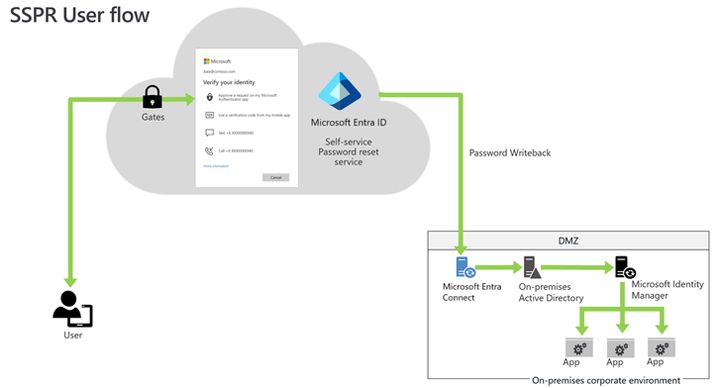
Figure 1: Microsoft Entra self-service password reset architecture
This diagram shows the end-to-end SSPR flow including user initiation, identity verification, policy evaluation, and optional on-premises active directory password writeback.
Pillar 2: Multi-factor authentication (MFA)
Microsoft Entra MFA strengthens credential security by requiring multiple forms of verification during sign-in. Even if a password is stolen, MFA significantly reduces the likelihood of unauthorized access and is a core component of Microsoft’s Zero Trust strategy.
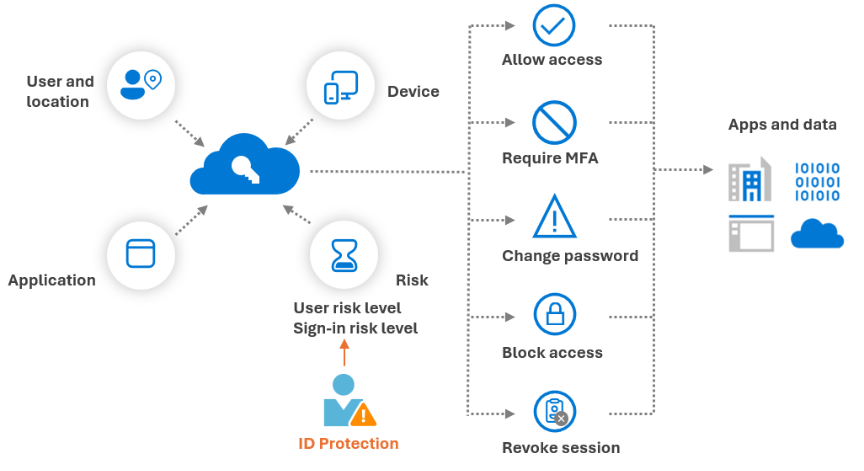
Figure 2: Microsoft Entra MFA sign-in flow
This diagram illustrates primary authentication, Conditional Access risk evaluation, secondary factor challenges, and successful or blocked access outcomes.
Pillar 3: Passwordless authentication
Passwordless authentication removes passwords entirely from the sign-in experience. Microsoft Entra ID supports passwordless methods such as Windows Hello for Business and Microsoft Authenticator, replacing shared secrets with device-bound or biometric credentials.
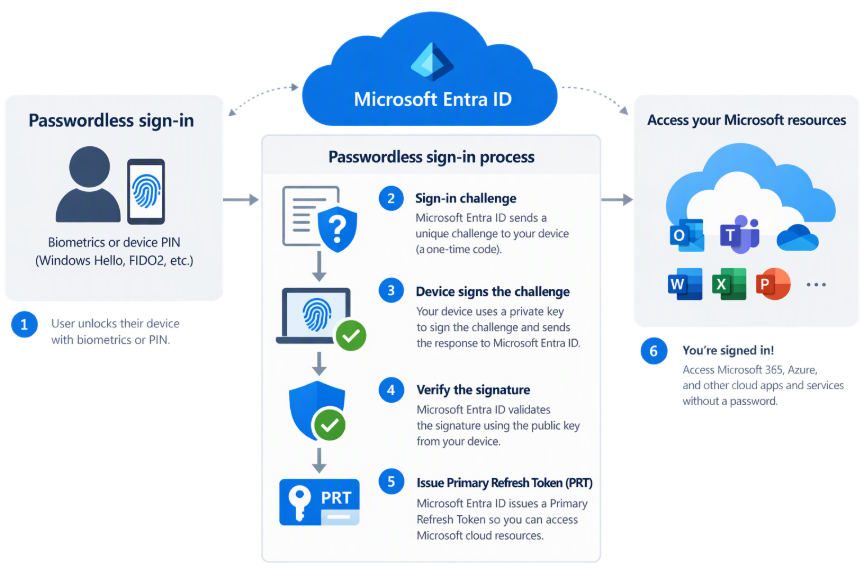
Figure 3: Passwordless authentication with Microsoft Entra ID
This diagram depicts passwordless sign-in using biometrics or device-based credentials, cryptographic validation through Entra ID, and single sign-on to cloud resources.
Pillar 4: FIDO2 & passkeys
FIDO2-based authentication represents the strongest form of credential protection in Microsoft’s identity roadmap. Leveraging public-key cryptography, FIDO2 passkeys eliminate phishing by ensuring credentials are never shared or replayed.
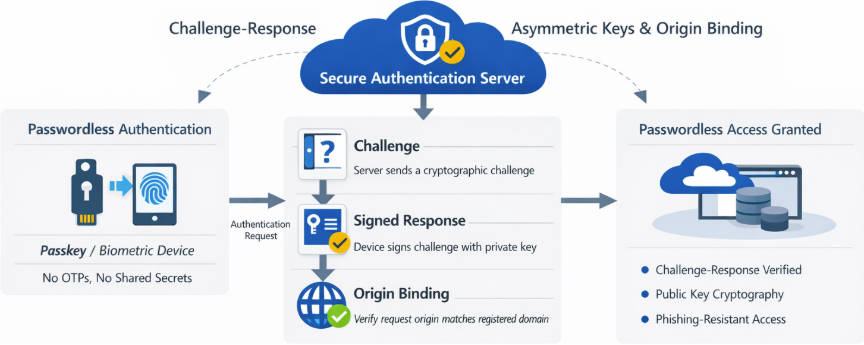
Figure 4: FIDO2 & passkey authentication flow
This diagram shows challenge-response authentication using asymmetric keys, origin binding, and passwordless access without one-time passwords or shared secrets.
Final notes: authentication method strengths
To conclude the credential management journey, Microsoft provides clear guidance on the relative strength of authentication methods, ranking them from weakest to strongest based on their resistance to phishing and credential theft.
As illustrated in the Microsoft security model below, traditional password-only authentication represents the weakest level of protection. While legacy MFA methods provide incremental improvement, they often remain vulnerable to phishing, relay attacks, and social engineering.
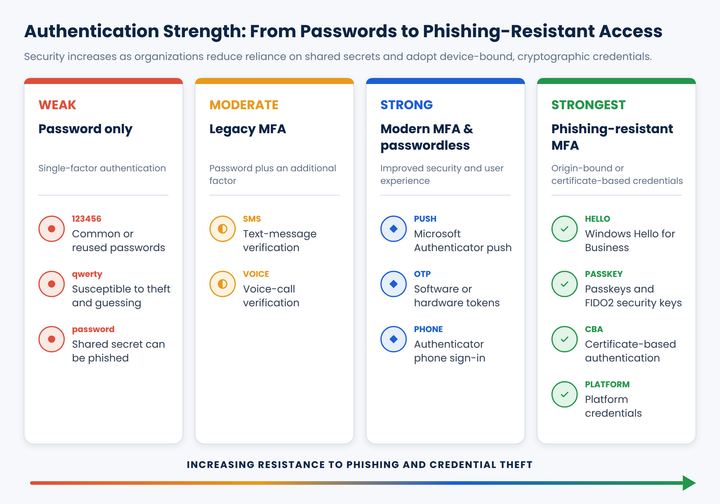
Figure 5: Microsoft authentication method strength comparison (weakest to strongest)
As organizations adopt modern authentication, passwordless and FIDO2-based methods deliver significantly stronger protection by eliminating shared secrets and introducing cryptographic, device-bound credentials. At the highest tier, phishing-resistant authentication, including FIDO2 security keys and passkeys, represents the strongest defense available today and aligns fully with Microsoft’s Zero Trust identity principles.
Organizations can use this model to guide a phased identity modernization strategy, prioritizing stronger authentication methods for privileged users, executives, and high-risk workloads, while steadily reducing reliance on passwords over time.
Ready to advance your organization’s credential management?
See how Collective Insights can help you better secure your information without slowing down your business.


