

SMS and voice authentication are retiring. Is your organization ready for a passkey-first future?
For years, SMS text messages and voice calls provided organizations with an accessible path beyond password-only authentication. They helped make multifactor authentication practical at scale, particularly for workforces that had not yet adopted more advanced authentication methods.
But the identity threat landscape has changed.
Microsoft has begun moving Microsoft Entra ID toward a passkey-first authentication model. On September 1, 2026, users enabled for SMS or voice authentication were automatically enabled for passkeys and brought into a Microsoft-managed registration campaign. Microsoft-provided SMS and voice delivery will begin retiring in 2027. This is more than an MFA product change. It is a signal that phishing-resistant authentication is moving from a security aspiration to a default enterprise expectation.
Why Microsoft is moving beyond SMS and voice
SMS and voice represented an important improvement over passwords alone, but they still depend on communication channels that attackers can intercept, manipulate, phish, or redirect. Microsoft identifies SMS and voice as substantially weaker protections against phishing and account compromise than passkeys.
Passkeys change the model. Instead of transmitting a password or one-time code, they use cryptographic keys tied to a device or synchronized credential store. Microsoft describes passkeys as resistant to phishing, SIM-swapping, and replay attacks because authentication does not rely on a reusable shared secret.
The result is an authentication experience designed to be both stronger and simpler. Depending on the platform and passkey type, users can authenticate through familiar mechanisms such as a fingerprint, facial recognition, device PIN, Microsoft Authenticator passkey, Windows-based passkey, or FIDO2 security key.
The Microsoft Entra ID timeline
September 1, 2026: Passkeys became the default
On September 1, 2026, Microsoft automatically enabled passkeys for users who were enabled for SMS or voice in the Entra authentication methods policy or legacy MFA settings.
These users were included in a passkey profile, and their organization’s registration campaign settings were placed into a Microsoft-managed state targeting passkeys. When an affected user attempted to sign in and complete MFA, the registration campaign prompted the user to register a passkey.
It is important to distinguish automatic enablement from automatic registration. Microsoft enabled the policy and prompted the user, but the user still needs to complete passkey registration. During this initial transition period, the registration prompt had unlimited snoozes by default.
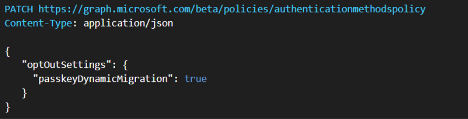
Microsoft is providing a temporary opt-out for the automatic enablement and registration campaign changes between September 1, 2026, and February 1, 2027. That opt-out delays automatic migration activity, but it does not exempt an organization from the subsequent retirement and enforcement dates. The opt-out requires users to grant the Microsoft Graph “Policy.ReadWrite.AuthenticationMethod” permission and set the “passkeyDynamicMigration” property to “true”.
February 1, 2027: Native SMS & voice authentication retires for most users
On February 1, 2027, Microsoft-provided SMS and voice authentication will be retired for all users except Global Administrators and external users. Internal guest users remain included in the February 1 retirement population.
After that date, in-scope users whose only available MFA method is Microsoft-provided SMS or voice will receive a blocking prompt requiring them to register a passkey before continuing to their account. Microsoft states that there is no opt-out from this enforcement behavior for the affected population.
This does not mean that every user will suddenly be locked out on February 1. Users who have already registered a passkey or another supported phishing-resistant method can continue using that method. Organizations that have configured and migrated affected users to a supported telephony provider can also continue providing SMS or voice where necessary.
July 1, 2027: Retirement extends to Global Administrators and external users
Microsoft-provided SMS and voice authentication will retire for Global Administrators and external users on July 1, 2027. Internal guest users are not part of this later group and remain subject to the February 1 date.
After July 1, Global Administrators and external users whose only available MFA method is Microsoft-provided SMS or voice will also encounter blocking passkey registration. Microsoft states that this enforcement has no opt-out.
Retirement does not mean SMS and voice disappear entirely
Microsoft is retiring Microsoft-provided telephony delivery as a native Entra ID capability. It is not preventing organizations from using SMS or voice under every circumstance.
Organizations with a legitimate business, regulatory, technical, or operational requirement can choose a supported telephony provider through Microsoft Security Store. Microsoft Entra ID will continue enforcing authentication policies and coordinating the authentication experience, while the selected provider delivers the text message or voice call.
Soprano and Telesign are the initial providers identified for private preview, with additional providers expected by general availability. The provider configuration experience became available on October 30, 2026. Organizations selecting this path are responsible for the provider relationship, commercial terms, regional coverage, configuration, and ongoing service monitoring. Microsoft nevertheless recommends using telephony providers only for user populations with a documented requirement. Its preferred migration path is passkeys or another phishing-resistant authentication method.
Why this is an identity-modernization decision
The immediate project may appear to be an authentication-method migration, but the broader implications reach across identity architecture, device management, onboarding, recovery, access policy, and user support.
Microsoft Entra ID supports both synced and device-bound passkeys. Synced passkeys can be stored in a supported platform credential manager (such as a web browser) and used across a user’s devices. Device-bound options include passkeys in Microsoft Authenticator, Microsoft Entra passkeys on Windows, and FIDO2 hardware security keys.
The appropriate method will vary by workforce. A managed Windows user may have a different path than a frontline worker using a shared device, a privileged administrator using a hardware security key, or an external user accessing resources from an unmanaged endpoint. A successful adoption program therefore requires more than enabling a tenant-wide setting. It requires a deliberate credential strategy that accounts for devices, personas, application access, recovery, and operational exceptions. Microsoft’s broader passwordless architecture combines Microsoft Entra ID as the identity authority with device and policy capabilities such as Microsoft Intune, Conditional Access, Windows Hello for Business, FIDO2 security keys, passkeys, certificates, and Temporary Access Pass. Microsoft also cautions that not every passwordless method provides the same level of phishing resistance.
What organizations should do now
- Identify the affected population: Determine which users are enabled for SMS or voice through the Entra ID authentication methods policy or legacy MFA settings. Microsoft provides an SMS and voice usage analyzer and recommends completing this inventory before designing the migration.
- Define the target authentication methods: Select the right phishing-resistant method for each user population. That may include synced passkeys, device-bound passkeys, Windows Hello for Business, Microsoft Entra passkeys on Windows, or FIDO2 security keys. Requirements for shared devices, administrators, contractors, mobile users, and recovery scenarios should be addressed explicitly.
- Separate strategic adoption from legitimate exceptions: Document the populations that genuinely require SMS or voice for regulatory, technical, business, or operational reasons. Evaluate a Microsoft Security Store telephony provider only for those users rather than preserving telephony as the default authentication experience.
- Pilot before enforcement: Enable passkeys and test the complete experience with representative users and devices. The pilot should validate registration, authentication, application access, device readiness, support procedures, and recovery paths before the retirement date. Microsoft recommends using a registration campaign to prompt users to set up passkeys during MFA sign-in and advises organizations to begin adoption before automatic enablement.
- Communicate in phases: Microsoft recommends an awareness, action, and reminder communication sequence. Users should understand why the experience is changing, which method they are expected to register, when prompts will begin, and where to obtain support.
The strategic takeaway
The retirement of Microsoft-provided SMS and voice delivery should not be approached as a last-minute configuration task. It is an opportunity to reduce dependence on phishable credentials, standardize stronger authentication, and establish a more resilient passwordless identity foundation.
Organizations that act early can inventory affected users, evaluate workforce scenarios, pilot the correct passkey options, resolve exception requirements, and prepare the support experience before registration becomes blocking. The direction is clear: passkeys are becoming the default Microsoft Entra ID authentication experience, and native SMS and voice delivery is moving to retirement. The organizations best positioned for that transition will be those that treat passwordless authentication as an identity transformation program, not simply another MFA rollout.
Collective Insights can help you navigate a passkey-first future
Learn how we can help ensure a seamless transition to passwordless authentication for your team.
1. Microsoft, “Passkeys by default and retirement of Microsoft-provided SMS and voice authentication,” last modified September 23, 2026, https://learn.microsoft.com/en-us/entra/identity/authentication/concept-sms-voice-retirement.
2. Microsoft, “Frequently asked questions about SMS and voice retirement,” last modified October 26, 2026, https://learn.microsoft.com/en-us/entra/identity/authentication/concept-sms-voice-retirement-faq.
3. Microsoft, “Microsoft Entra ID security updates: Passkeys are the default authentication method in Entra ID,” July 13, 2026, https://www.microsoft.com/en-us/security/blog/2026/07/13/microsoft-entra-id-security-updates-passkeys-are-the-default-authentication-method-in-entra-id/.
4. Microsoft, “Choose a telephony authentication provider for SMS and voice authentication,” last modified September 23, 2026, https://learn.microsoft.com/en-us/entra/identity/authentication/concept-phone-providers.
5. Microsoft, “Plan a phishing-resistant passwordless authentication deployment in Microsoft Entra ID,” last modified March 26, 2026, https://learn.microsoft.com/en-us/entra/identity/authentication/how-to-deploy-phishing-resistant-passwordless-authentication.
6. Microsoft, “Passwordless authentication with Microsoft Intune,” last modified April 13, 2026, https://learn.microsoft.com/en-us/intune/solutions/passwordless.
7. Microsoft, “Entra SMS/Voice Usage Policy Scanner,” GitHub, accessed October 27, 2026, https://github.com/microsoft/entra-sms-voice-usage-analyzer.


